Refunds
Payment may be refunded multiple times for a total amount not exceeding the payment amount and it is allowed only for
payments in status CONFIRMED.
Paynow accepts refunds with a minimum amount 1 PLN for CARD payment, for other 0.01 PLN.
To be able to make a standard refund by API your shop must have enabled "Once a day" variant of payout schedule for given shop. The funds needed to make the return will be taken from your balance.
If there are not enough funds on your balance to make a refund (e.g. your shop has few or no recent sales), you can use a refund with bank transfer. Such refund is not taken from your balance – it is funded by a dedicated bank transfer made for that specific refund.
You can also receive notifications when a refund reaches its final status.
Awaiting refunds - optional
Awaiting refund is a special type of refund which can be initialized even if the refund amount exceeds your balance.
After initialization, such refund will be in NEW status.
When enough funds have been accumulated on your balance, refunds will be processed using FIFO algorithm (that means the
refunds are being processed in the order in which they were initialized).
If you do not accumulate the necessary funds for a refund on your balance for 120 hours (5 days, default value), the
refund status will change to CANCELLED.
You can change the time after which awaiting refunds will be cancelled - the unit of this parameter is an hour.
To enable this feature for your shop and/or change the default awaiting refund cancellation time (optional) go
to Settings > Awaiting refunds tab in the Merchant Panel.
An awaiting refund waits for funds from future sales to accumulate on your balance. A refund with bank transfer does not use your balance at all – it is funded by a bank transfer made for that specific refund. Use it when you do not expect enough sales to cover the refund in time.
Flow diagram
The following picture shows the positive refund flow:
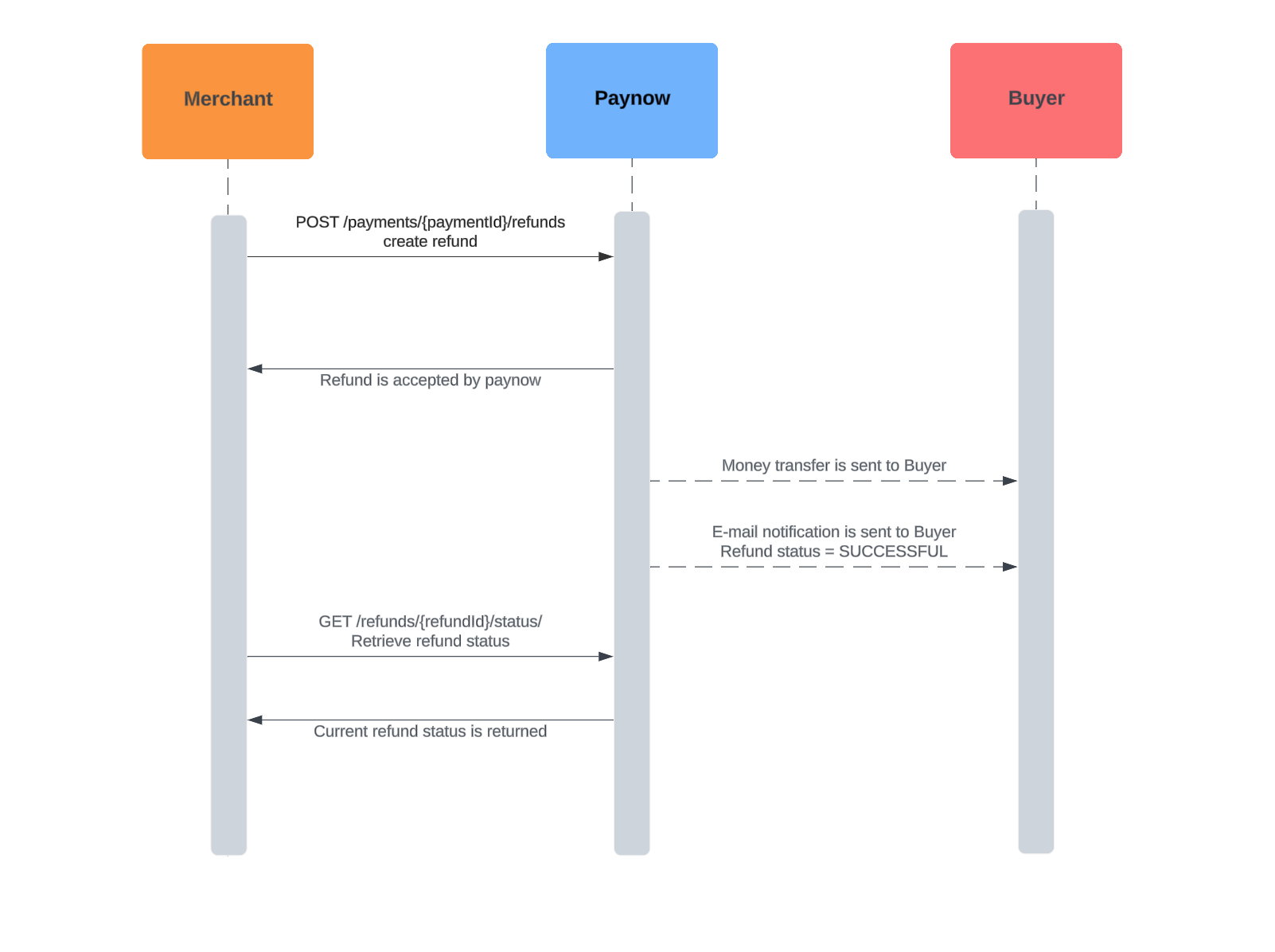
Flow of statuses
The following picture shows all the statuses that a refund can take, and possible transitions between those statuses:
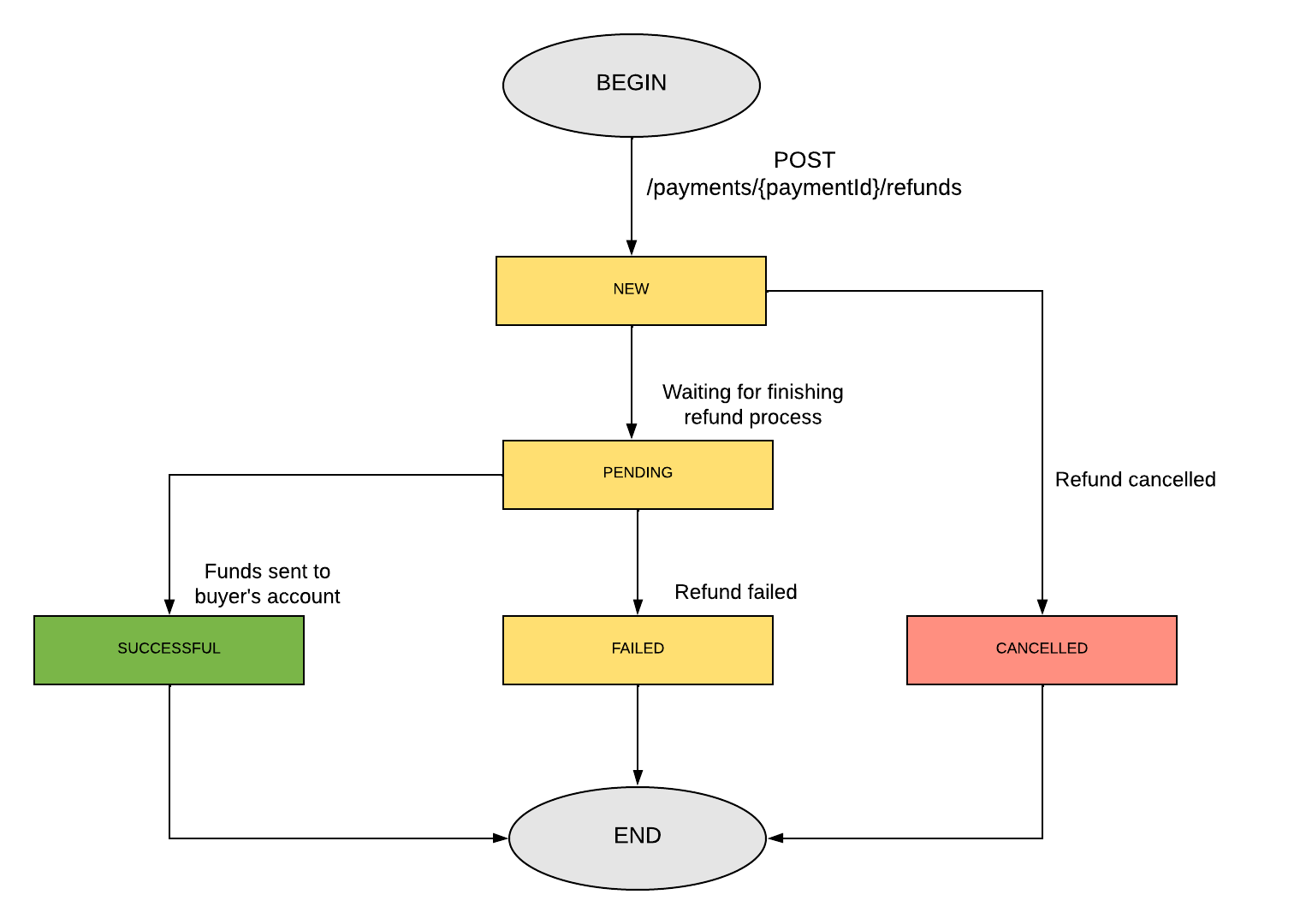
Explanation:
| Code | Description |
|---|---|
| NEW | Refund has been accepted. |
| PENDING | Paynow starts to process the request. |
| SUCCESSFUL | Refund has been successfully processed by Paynow and money has been transferred to the buyers account. |
| FAILED | Refund encountered a problem during the processing. Money has not been transferred to the Buyer. |
| CANCELLED | Refund was cancelled. Money has not been transferred to the Buyer. Only refunds in status NEW can be cancelled. |
Make a refund
For the purpose of this guide, let's assume that your keys are:
- Api-Key =
97a55694-5478-43b5-b406-fb49ebfdd2b5 - Signature-Key =
b305b996-bca5-4404-a0b7-2ccea3d2b64b
Let's also assume, that paymentId is NOR3-FUN-D4U-LOL
Step 1: Prepare a refund request message. Throughout this example, we'll use a simple message containing only required fields which look as follows:
{
  "amount": 100,
  "reason": "RMA"
}
The provided amount should be given in the smallest unit of refund currency (grosz in case of PLN). This means that the above request defines a refund for 1.00 PLN. Description field should contain reason of refund. Full specification for refund request message can be found below.
Optionally, you can add the notificationUrl field. If provided, Paynow will send a notification to this address when
the refund reaches its final status. See Refund status notifications.
{
    "amount": 100,
    "reason": "RMA",
    "notificationUrl": "https://shop.example.com/paynow/refund-notifications"
}
Step 2: Attach Api-Key header with the value of Api-Key available in the Merchant Panel.
Step 3: Calculate signature and attach it as the Signature header. For given
example correct signature is o5HQfxngBqr68sLOEtJu0fd1Cl/GzfehZEswk6KMb0w=
If you are trying to calculate the signature from the example in your code and are getting a different result, make sure that your JSON message is formatted the same way as the message in the example, i.e. with four-space indentation and no newline character at the end.
Step 4: Generate random string with maximum length of 45 characters for an Idempotency-Key header.
Step 5: Make a POST with prepared message on refund request endpoint
curl --location 'https://api.sandbox.paynow.pl/v3/payments/NOM3-VWX-YS7-J43/refunds' \
--header 'Api-Key: 97a55694-5478-43b5-b406-fb49ebfdd2b5' \
--header 'Signature: o5HQfxngBqr68sLOEtJu0fd1Cl/GzfehZEswk6KMb0w=' \
--header 'Content-Type: application/json' \
--data '{
    "amount": 100
}'
Bear in mind, that the request must include Host and Accept headers as
described here. They are not listed above explicitly as the curl
command includes them by default.
Step 6: Handle the returned response:
{
  "refundId": "RE6-9YD-ULU-MRL",
  "status": "PENDING"
}
The response contains ID of the refund generated by Paynow and the current status of the refund.
Returned refundId should be saved by Merchant for further reference.
Step 7: Query the status of refund. See get refund status endpoint description.
  curl --location --request GET 'https://api.sandbox.paynow.pl/v3/refunds/RE6-9YD-ULU-MRL/status' \
  --header 'Api-Key: 97a55694-5478-43b5-b406-fb49ebfdd2b5' \
  --header 'Idempotency-Key: 6228e8f1-4fd9-40bc-9660-37b03c968590' \
  --header 'Signature: Aqy2xIQAZghJX4jdzeMZa7I/3WcI2saIAt0qzLoZiMU='
Instead of querying the status, you can pass notificationUrl in Step 1 and wait for a
notification.
To see more details about statuses, please refer to the Flow Diagram
Cancel awaiting refund
If you have enabled awaiting refunds mechanism
every new balance refund will be executed with some delay. When refund is in status NEW (awaiting) you can cancel it
using an API request. The same request cancels a refund with bank transfer that is still waiting for
the bank transfer.
Below you can see how to do it.
For this guide purposes let's assume that:
- Your Api-Key is:
97a55694-5478-43b5-b406-fb49ebfdd2b5 - Your Refund Id is:
RE1-K7E-206-31J
Step 1: Generate random string with maximum length of 45 characters for an Idempotency-Key header.
Step 2: Make this call to our API:
curl --location --request POST 'https://api.sandbox.paynow.pl/v3/refunds/RE6-9YD-ULU-MRL/cancel' \
-H 'Api-Key: 97a55694-5478-43b5-b406-fb49ebfdd2b5' \
-H 'Signature: e3JjMoexXydWjfBX8ArbExJu8YhTycwKEk0uWc9rXuM='
Please, keep in mind that with this call you can only cancel refunds that are in NEW status: awaiting refunds from
balance and refunds with bank transfer for which the transfer has not been booked yet.
Refund with bank transfer
Refund with bank transfer lets you refund a payment even if there are not enough funds on your balance. Instead of taking the money from your balance, Paynow returns the details of a bank transfer that must be made to cover the refund. When the transfer is booked on the Paynow refund account, the refund is processed and the money is transferred to the buyer.
How it works
- (Optional) You request a standard refund and receive the
INSUFFICIENT_BALANCE_FUNDSerror, which means that there are not enough funds on the balance. - You request a refund with bank transfer and set how long Paynow should wait for the transfer (
validityTime, from 3 to 10 days). - Paynow creates the refund in
NEWstatus and returns the bank transfer details (bankTransferData): account number, amount, currency, title and recipient details. The refund is not processed yet. - You make the bank transfer.
- When the transfer is booked on the Paynow refund account, the refund is processed and the money is transferred to the buyer.
- If the transfer is not booked within
validityTime, the refund is cancelled (CANCELLED). - If you provided
notificationUrl, Paynow sends a notification when the refund is completed, failed or cancelled.
The transfer must exactly match the returned bankTransferData – the same amount and currency, to the given account
number and with the given title. Otherwise Paynow will not be able to match the transfer with the refund and the
refund will not be processed.
Make a refund with bank transfer
Required headers are the same as for a standard refund: Api-Key, Signature, Idempotency-Key,
Content-Type, Host and Accept.
Step 1: Prepare a refund request message:
{
    "amount": 10000,
    "reason": "RMA",
    "validityTime": 432000,
    "notificationUrl": "https://shop.example.com/paynow/refund-notifications"
}
amount(required) – refund amount in the smallest currency unit (e.g. grosz for PLN).validityTime(required) – time in seconds that Paynow waits for the bank transfer (259200to864000, i.e. from 3 to 10 days).reason(optional) – refund reason (RMA,REFUND_BEFORE_14,REFUND_AFTER_14,OTHER).notificationUrl(optional) – URL for refund status notifications.
Step 2: Attach Api-Key header, calculate signature and attach it
as the Signature header, generate an Idempotency-Key.
Step 3: Make a POST with prepared message on refund with bank transfer endpoint:
curl --location 'https://api.sandbox.paynow.pl/v3/payments/NOM3-VWX-YS7-J43/refunds/accounts' \
--header 'Api-Key: 97a55694-5478-43b5-b406-fb49ebfdd2b5' \
--header 'Signature: {calculated-signature}' \
--header 'Idempotency-Key: {idempotency-key}' \
--header 'Content-Type: application/json' \
--data '{
    "amount": 10000,
    "reason": "RMA",
    "validityTime": 432000,
    "notificationUrl": "https://shop.example.com/paynow/refund-notifications"
}'
Step 4: Handle the returned response:
{
    "refundId": "RE6-9YD-ULU-MRL",
    "status": "NEW",
    "bankTransferData": {
        "accountNumber": "{refund-account-number}",
        "amount": 10000,
        "currency": "PLN",
        "title": "{transfer-title}",
        "recipientName": "{recipient-name}",
        "recipientAddress": "{recipient-address}"
    }
}
Step 5: Make the bank transfer using bankTransferData – the exact amount and currency, to the given account number
and with the given title.
Step 6: Wait for a notification or query the
refund status as described in Make a refund, Step 7. Until the
transfer is booked, the refund stays in NEW status.
To cancel a refund with bank transfer before the transfer is booked, use the cancel request.
Refund status notifications
Paynow can notify you when a refund reaches its final status, in the same way as for payments. Notifications work for all types of refunds. They are especially useful for refunds with bank transfer and awaiting refunds, which may be completed even several days after they were requested – instead of querying the refund status repeatedly, you can rely on the notification.
To receive notifications, provide the optional notificationUrl field when you request a refund – both a
standard refund (including an awaiting refund) and a refund with bank transfer. The
address is set for each refund separately. If you do not provide it, no notifications will be sent for that refund.
Notifications are sent only when the refund changes its status to one of the final statuses:
| Code | Description |
|---|---|
| SUCCESSFUL | Refund has been successfully processed and money has been transferred to the buyer. |
| FAILED | Refund encountered a problem during the processing. |
| CANCELLED | Refund was cancelled via API or because validityTime has expired. |
Paynow makes a POST request with Content-Type: application/json and Signature header to the given
notificationUrl:
{
    "refundId": "RE6-9YD-ULU-MRL",
    "status": "SUCCESSFUL"
}
When status is FAILED, the notification also includes failureReason (CARD_BALANCE_ERROR, BUYER_ACCOUNT_CLOSED
or OTHER):
{
    "refundId": "RE6-9YD-ULU-MRL",
    "status": "FAILED",
    "failureReason": "OTHER"
}
- Verify the
Signatureheader in the same way as for payment notifications – see Notifications signature. If the signature does not match, do not process the message. - Respond with
200 OKor202 Acceptedand an empty body. Any other response is treated as a delivery failure. - Failed deliveries are retried according to the same schedule as for payments. If all attempts fail, query the refund status.
- The same notification may be delivered more than once – make sure your handler is idempotent.